 tyjokr
Install on Windows
- Download the zip.
- Extract the contents of the zip into your Mods folder, no more than one folder deep.
- In the game, open Game Options, then Other, and make sure Enable Custom Content and Mods and Script Mods Allowed are ticked. Restart the game if you changed them.
Coming from thepancake1's Color Sliders? Remove it first.
Smart App Control
Smart App Control may block Color Sliders from running. The current workaround is to turn Smart App Control off.
Open Windows Settings, then Privacy & security, Windows Security, App & browser control, Smart App Control settings, and choose Off.
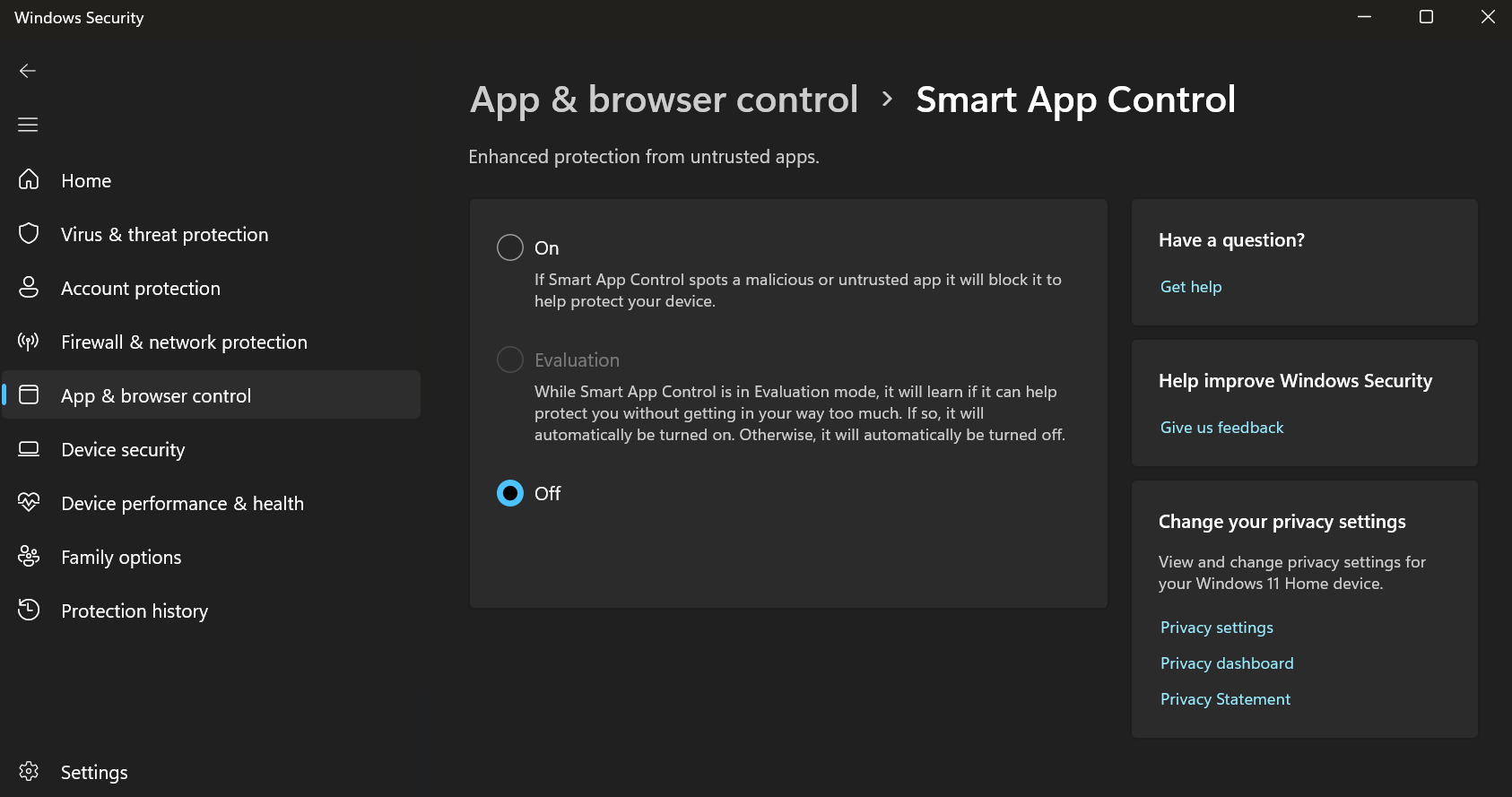
Smart App Control is a Windows security feature. Only use this workaround if you are comfortable doing so.
Uninstall
Delete the four tyjokr_ColorSliders files from your Mods folder.
Install on macOS
Only Apple silicon Macs are supported at this time.
- Download the zip.
- Extract the contents of the zip. Set
TS4ColorSlidersSetup.zipaside for now. - Place the remaining files into your Mods folder, no more than one folder deep.
- Extract
TS4ColorSlidersSetup.zipand open the app. - When the security warning appears, click Done to dismiss it.
- Open your Mac's System Settings and go to Privacy & Security.
- Scroll down to the Security section near the bottom. You should see a notice about the app. Click Open Anyway.
- Open the app again if it does not launch automatically, then run the setup.
- Enter your Mac password when prompted to complete the setup.
- In the game, open Game Options, then Other, and make sure Enable Custom Content and Mods and Script Mods Allowed are ticked. Restart the game if you changed them.
Keep the TS4 Color Sliders Setup app somewhere safe. You will need to run it once after each game patch. When you update Color Sliders, run the Setup app that comes with the new download.
Coming from thepancake1's Color Sliders? Remove it first.
Watch the macOS setup
Video by SimMattically.
Uninstall
Delete the three tyjokr_ColorSliders files from your Mods folder.
What's new
Inspired by thepancake1's original mod, but built from the ground up.
Every pack
Support for all CAS items across every released expansion pack, game pack, stuff pack and kit.
No texture packages
A small native adapter lets the game color-shift its own textures. Nothing is cloned or overridden, which frees up more than 20 GB for players who own every pack.
101 slots, up from 90
New: Skin Overlays, Head Tattoos, and the Horse slots (Saddle, Bridle, Reins, Blanket, Hoof Color, Mane, Tail, Forelock, Feathers and Horn).
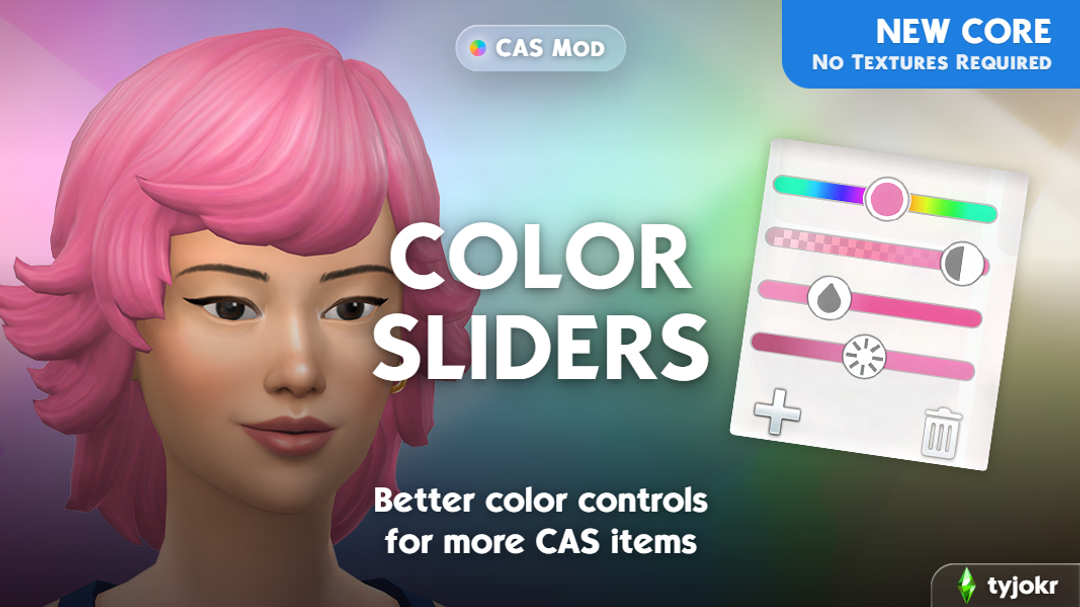
Redesigned sliders
Tracks preview your color as you drag, with steps five times finer than before, allowing for more precise colors.
Tidier panels
Sliders that cannot affect an item are hidden, and several EA visual and slider bugs are fixed.
Works with your mods
Compatible with More Columns in CAS and with existing Color Sliders-enabled CC.
See it in action
Compatibility
- Built on game version 1.129.39. Older game versions are not supported.
- More Columns in CAS works, as long as you place Color Sliders in a priority folder (opens in new tab).
- Color Sliders (Classic) cannot be installed at the same time.
- TS4 Access cannot be installed at the same time. Both mods replace some of the same interface files.
- Other mods that change CAS may conflict. Their creators will need to update them to work with Color Sliders.
Supported slots
See all 101 slots
Hair 8
Hair, Facial hair, Eyebrows, Eyelashes, Body hair (arms, legs, chest, back)
Clothing 9
Hats, Tops, Bottoms, Full body outfits, Shoes, Socks, Tights, Gloves, Base layers
Accessories 20
Earrings, Glasses, Necklaces, Bracelets (left, right), Rings (index, middle and ring finger on each hand), Piercings (brow, lip and nose on each side), Fingernails, Toenails, Head decorations
Makeup 5
Lipstick, Eyeshadow, Eyeliner, Blush, Face paint
Face details 19
Acne, Birthmark, Forehead creases, Mouth creases, Dimples (left, right), Freckles, Moles (cheeks, face, lips), Scar, Brow, Cheeks (left, right), Eyelid, Eye socket, Mouth
Body details 19
Birthmarks (arms, legs, front, back), Scars (arms, legs, front, back, forearm, neck), Freckles, Moles (upper back, upper chest), Stretch marks (front, back), Skin shine, Skin overlay New
Tattoos 11
Upper arms, Lower arms, Legs, Upper and lower chest, Upper and lower back, Head New
Horses 10
Saddle, Bridle, Reins, Blanket, Hoof color, Mane, Tail, Forelock, Feathers, Horn New
Coming from Color Sliders (Classic)
- Delete the Classic package from your Mods folder:
thepancake1_ColorSliders_Classic.packageorthepancake1_ColorSliders_MoreColumns4.package. - Delete the
ColorSliders_Texturespackages. The new mod does not use them. - Install Color Sliders with the steps for your computer above.
Questions
I have both Color Sliders and More Columns in CAS installed and it's not working
Color Sliders has to be in a priority folder. My priority folder guide (opens in new tab) explains how to set one up.
A folder only counts as a priority folder once your Resource.cfg file gives it a higher priority.
If More Columns in CAS is in the same folder as Color Sliders, or in a folder with a higher priority, Color Sliders will not work properly. Leave More Columns in CAS in your regular Mods folder.
Signs of this: no sliders on hair or eyebrows, or panels missing in Create a Sim, such as face details, accessories or skin tones.
How is this different from Color Sliders by thepancake1?
Color Sliders by thepancake1 (Classic) works by replacing the game's textures, so it needs a texture pack for each game pack you own. This version recolors the game's own textures as you move the sliders, so there is nothing extra to download. It also has redesigned sliders that move in finer steps, and it covers more of Create a Sim, including skin overlays, head tattoos and horses. It uses a script and a small helper file, so it has a few more install steps than Classic.
Can I have both installed?
No. They change the same parts of Create a Sim, so only one can be installed at a time. Remove Classic before installing this version.
Do I still need the texture packs?
No. This version does not use them, so you can remove them.
I'm on macOS and my game sometimes crashes on startup with this mod installed
This is a known issue that I'm actively investigating. The crash is harmless, though annoying. Keep starting the game and it should load without crashing eventually.
Color Sliders is stable on Windows, but macOS has quirks of its own that are taking more time to work through.
Why aren't Intel Macs supported?
I don't have access to an Intel Mac, and I need one to build and test the mod for it. If you have one and would like to help me test, reach out to me on Discord: @tyjokr
Why aren't my CC hair and clothes working with the mod?
That CC was not made with color sliders in mind. Only slider-compatible CC is supported at this time.
Why do I need a .dll or .dylib file in my Mods folder? What does it do?
The game can only recolor a small part of its own textures. This file lets it recolor the rest as you move the sliders, which a package or script cannot do by itself. It is used only by The Sims 4 and while the game is running.
Why does the mod require workarounds for Smart App Control and macOS security?
The mod's .dll and Setup app are not signed with a paid developer certificate, so Windows and macOS treat them as unknown and ask you to approve them. For reference, Sims 4 Studio is not signed with this kind of certificate either and requires the same workarounds.
I have a question, an issue, or feedback that isn't covered here
Leave a comment on the Color Sliders post on Patreon (opens in new tab), or message me on Discord: @tyjokr
If you are reporting an issue, please include your operating system and game version.
About
thepancake1 has stepped away from modding and has kindly let tyjokr adopt Color Sliders. Both versions are supported: this one, and Color Sliders (Classic).
Special thanks to thepancake1 for his trust, and to SimMattically for helping test the mod.